
myApria Medical Supplies
Accendra HealthMedical
4.7102.00 Reviews
- Version
- 1.0.4
- Installs
- 10.00K
- Age Rating
- Everyone
Screenshots
Our Review of myApria Medical Supplies
 Analysis by Appyee
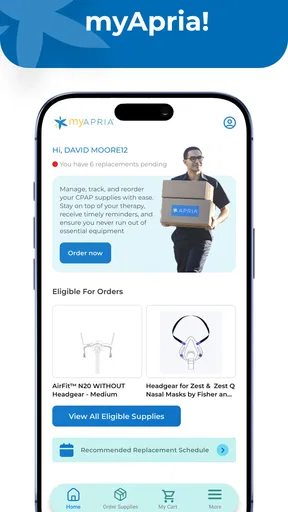
Managing medical supplies is rarely difficult because of one big task. The real frustration comes from the small ones: remembering what needs replacing, checking whether an order has moved, and keeping insurance-related purchases connected to the right provider. myApria is built around reducing that administrative friction for Apria customers. It is a free medical app from Accendra Health that brings Apria information, supply ordering through insurance, and shipment tracking into one mobile place.
After using it, my main impression is that its value depends less on entertainment or clever extras and more on whether you regularly deal with Apria supplies. This is not a general health tracker, symptom checker, medication reminder, or emergency-care tool. Its useful job is narrower: making the supply-ordering process easier to follow. That focus is a strength when you need replacement equipment, but it also explains why someone outside the Apria service would gain very little from installing it.
Why supply ordering is the important capability
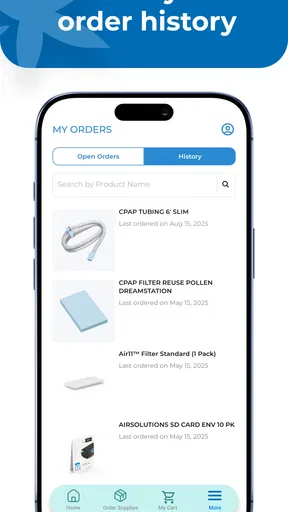
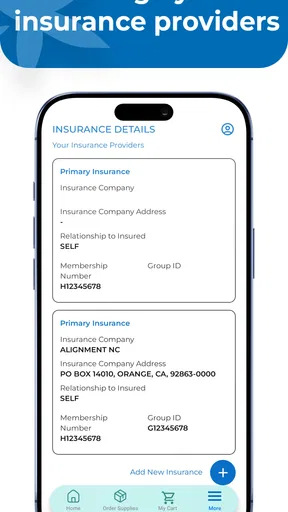
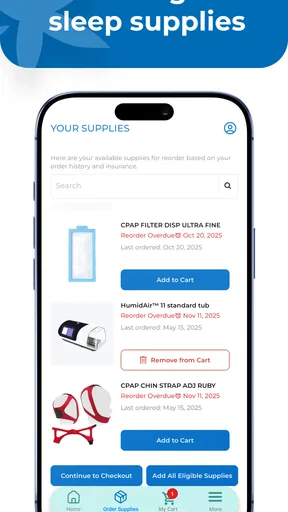
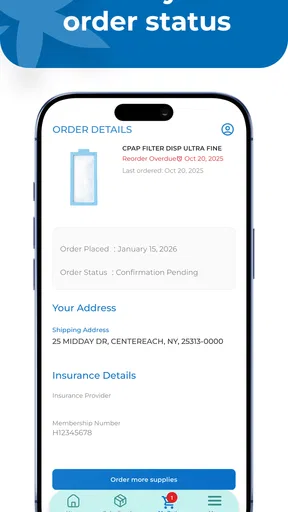
The most meaningful part of the experience is the ability to order supplies through insurance and then follow the shipment. In ordinary life, those tasks are often split between phone calls, patient portals, emails, paper notices, and delivery updates. A dedicated app can make the process feel less like a chain of disconnected errands.
That matters especially for supplies that are part of a continuing routine. If a person depends on respiratory equipment or another recurring medical supply, running out is not the same as forgetting to buy household items. The order has to be associated with the right coverage and provider, and delivery timing can affect whether the person has a comfortable backup. Having the order and its movement visible from the same app gives the process a clearer center.
I would not describe this as a replacement for medical advice. The app’s role is administrative and logistical. It helps with access to supplies, not with deciding whether a treatment is appropriate or diagnosing a new problem. That distinction is important: if your concern is a change in symptoms, an equipment problem that may be unsafe, or an urgent health issue, you still need the appropriate healthcare professional or emergency service.
The app is listed in the Medical category, and its audience is broad enough to carry an Everyone age rating. That does not mean every person will find it useful. The practical audience is Apria customers, caregivers, and family members who help manage supply orders. For them, the focused design can be more useful than a broad wellness app filled with tools unrelated to equipment delivery.
What the app changes in a normal order
Without a dedicated ordering tool, a person may need to search for contact details, explain their account repeatedly, ask whether insurance can be used, and then contact the supplier again to find out where the package is. myApria brings those stages closer together. The benefit is not simply that ordering happens on a phone; it is that the user can keep the supply request and delivery follow-up in one familiar workflow.
In my view, the shipment-tracking side is just as important as the ordering side. A confirmation alone leaves an awkward gap between “the request was made” and “the package is actually on its way.” Tracking gives the user a reason to check the app and a better sense of whether to wait, prepare for delivery, or contact Apria when something does not look right.
A useful habit is to check the order status before the current supply is nearly finished. That turns tracking into planning rather than panic. It also gives you time to notice an unexpected delay while you still have an opportunity to ask for help. The app cannot remove every delay in a healthcare supply chain, but it can make a delay easier to notice.
How I would use it in practice
I would start by treating the app as an order record rather than a general health dashboard. When supplies are needed, I would review the available information carefully, confirm that the request matches what is actually needed, and then use the app to follow the shipment instead of relying on memory. That simple approach reduces the chance of placing a rushed request or overlooking a delivery update.
For a caregiver, the workflow can be even more practical. Imagine helping a parent who uses medical equipment at home. You place the supply request while sitting together, then check the shipment progress later without asking the parent to remember a reference number or repeat the entire situation by phone. The caregiver still needs to pay attention to the patient’s actual needs, but the app can take some of the routine coordination out of the conversation.
One non-obvious advantage is that tracking can help separate two different problems: an order that has not moved forward and a package that has already shipped but is late. Those situations usually call for different follow-up. Seeing the order’s progress before making contact can help you explain the issue more clearly and avoid wasting time asking a broad “where is my order?” question.
Another useful practice is to make the app part of a recurring household check rather than opening it only after supplies run out. For someone with regular replacement needs, a quick review at the same time each month can reveal whether the next order should be started. I would still keep a personal backup plan, because a mobile status screen should not be the only safeguard for supplies that are essential to daily care.
The app’s current version is 1.0.4, so I approached it as a focused tool that may still feel more limited than a long-established all-purpose patient portal. That is not automatically a problem. A smaller scope can make the main task easier to find, but it also means users should not expect every healthcare account function to appear here.
The best everyday scenario
The strongest use case is a person who already receives Apria supplies and wants fewer phone-based steps. Picture someone preparing for a busy week at home. Their remaining supplies are getting low, but they are not yet in an emergency situation. Instead of waiting until the last moment, they open myApria, handle the insurance-related order, and later return to check the shipment. If the status progresses normally, they have reassurance without another call. If it stalls, they discover that early enough to seek assistance.
This scenario shows the real effect of the app: it turns an uncertain waiting period into something visible. The user still has to make sensible decisions, and the app cannot guarantee delivery timing, but the order no longer disappears into the background after it is submitted. For a caregiver balancing appointments, work, and household responsibilities, that visibility can be more valuable than a large collection of unrelated features.
It is also useful when a delivery needs to be coordinated with someone else at home. A family member can check the shipment progress before deciding whether to stay available for a delivery or ask another person to watch for it. I would not rely on the app alone for a time-critical medical need, but for ordinary planning it can reduce unnecessary uncertainty.
Where the experience has limits
The biggest trade-off is the app’s narrow purpose. If you are looking for medication schedules, doctor messaging, test results, appointment booking, symptom education, or a complete personal health record, this is not the right kind of app to choose. A hospital portal or broader patient-management service may be more appropriate for those needs.
It is also not a substitute for speaking with Apria when an order contains an error, insurance information has changed, or the required supply is not represented correctly. Digital ordering is convenient when the routine is straightforward. It can become less convenient when the situation is unusual and needs explanation. In those cases, a direct conversation may be faster than trying to force a complicated request through a standard mobile flow.
There is a second trade-off in relying on shipment tracking: a status update is useful information, but it is not a promise that the package will solve an urgent shortage. I would place orders with enough time for ordinary delays and keep relevant account or insurance details available when contacting support. The app improves visibility; it does not remove the need for judgment.
People who rarely order supplies may also find the app unnecessary. Installing a dedicated tool for a single occasional request may not feel worthwhile, particularly if they already have a satisfactory way to contact Apria. The strongest value appears when ordering and tracking are repeated tasks, not one-time events.
Privacy and device access deserve ordinary care as well. Because this is a medical app, I would use it on a personal device, keep the phone protected, and avoid leaving an account open where other people can casually view it. I would also make sure a caregiver understands which actions they are taking on the patient’s behalf. The app’s convenience should not lead to careless sharing of health or insurance details.
How it compares with the usual alternatives
The usual alternative is a phone call. Calling can be better when the request is complicated, when coverage needs clarification, or when a human explanation is essential. The disadvantage is that it can take more time and gives the user less immediate visibility after the conversation ends. myApria is better suited to routine requests and progress checks where the information can be handled directly.
Email and text updates can be useful reminders, but they often show only one part of the journey. An individual notification may confirm a step without giving the user a convenient place to review the broader order context. A dedicated app is more useful when you want to return to the process and check its current state rather than search through messages.
A general insurance or healthcare portal may offer a wider range of account services. That breadth can be valuable, especially for people who want appointments, claims, records, and messages in one place. However, a broad portal may not be as focused on Apria supply ordering and shipment follow-up. I see myApria as the more direct option for that specific task, while a general portal remains the better choice for wider healthcare administration.
The practical choice is therefore not “app versus every other method.” It is about the kind of problem you have. For a routine Apria supply order, the app’s focused path is appealing. For a disputed coverage issue, urgent shortage, or medical question, a phone call or healthcare professional is likely the better route.
Who will gain the most from it
I would recommend myApria first to Apria customers who order supplies more than once, want to use insurance during the process, and prefer checking delivery progress themselves. Caregivers are another strong audience because the app can make a repetitive coordination task easier to share and revisit. People who are comfortable using a smartphone may appreciate the independence of checking an order without waiting for office hours.
The app has a 4.7 average from around 437 ratings, with over 100 written reviews, and it has passed the 10K-plus install mark. Those figures suggest that it has found a real audience, although they should not replace your own judgment about whether its focused purpose matches your needs. It is free to install, which lowers the barrier for someone who wants to try it without adding an app subscription to the household budget.
I would be more cautious about recommending it to someone who needs a complete healthcare-management platform or who has difficulty navigating digital account tools. A family member may be able to help, but that arrangement should be clear and secure. Likewise, anyone facing an urgent medical concern should not wait for an app workflow or shipment update before seeking appropriate help.
For me, the strongest reason to keep it installed is not that it does many things. It is that the one thing it concentrates on—managing Apria supply orders and following their delivery—can otherwise become a recurring source of uncertainty. The developer, Accendra Health, has kept the concept easy to understand: use the app when the task is an Apria supply request, then return when you need to know what happened next.
Overall, I see myApria as a practical companion for an ongoing supply routine rather than a complete medical service. Its best quality is the connection between ordering through insurance and tracking the shipment afterward. That connection can help a user plan earlier, spot a stalled order, and reduce avoidable calls. Its limits are equally clear: it is not medical advice, not an emergency channel, and not a universal patient portal.
My recommendation is straightforward: if Apria supplies are part of your regular care or you manage them for someone else, the free app is worth trying because its focused workflow addresses a genuinely annoying everyday task. If you only need occasional help or require broader healthcare features, keep the usual phone or patient-portal option available. Used for the right situation, it makes supply logistics easier to see and easier to manage, which is exactly where this app earns its place.
Verdict
Strengths of myApria Medical Supplies
- Easy access to Apria account and medical supply information.
- Useful for managing recurring supply orders from a mobile device.
- Helps users review order status and delivery updates in one place.
- Convenient for customers who need ongoing home medical equipment.
- Digital access can reduce the need for routine phone calls to support.
Limitations of myApria Medical Supplies
- Availability of features may depend on your Apria account and location.
- Some medical supplies may still require approval or staff assistance.
- Delivery updates may not always reflect the latest shipment status.
- The app is mainly useful for existing Apria customers, not new shoppers.
- Users may need stable internet access to manage orders and account details.
Other Releases by Accendra Health
View All
mybyram: Medical Supply Orders
Medical4.6
Similar Picks in This Category
View All
WebMD: Symptom Checker
WebMD, LLC4.1

Microphone Amplifier
DOSA Apps4.2

Anatomy Learning - 3D Anatomy
3D Medical OU4.5

Period Tracker and Calendar
SimpleInnovation4.9

GoodRx: Prescription Coupons
GoodRx4.8

CVS Health
CVS Pharmacy4.5
Frequently Asked Questions
What is myApria Medical Supplies used for?
myApria Medical Supplies is designed for Apria Healthcare customers who need to manage medical equipment and supply-related services from a mobile device. Depending on your account and location, the app may help you review equipment information, request or reorder eligible supplies, check delivery details, access support resources, and communicate with Apria. Available features can vary by insurance coverage, prescribed equipment, and account status.
Who can use the myApria Medical Supplies app?
The app is primarily intended for existing Apria Healthcare patients and customers who receive eligible medical equipment or supplies through Apria. You will generally need an active account and may be required to verify your identity before accessing personal information. Caregivers or family members should confirm whether they are authorized to manage another person’s account, since access permissions and supported services may differ.
Can I order or reorder medical supplies through the app?
For eligible products and accounts, myApria Medical Supplies may allow you to request replacement or recurring supplies without calling customer service. However, the app does not replace a prescription, insurance approval, or Apria’s fulfillment policies. Some items may require clinical review, updated documentation, or confirmation that you still meet coverage requirements, so an order request may not be approved immediately.
Is my personal health and account information secure in myApria Medical Supplies?
Because the app can provide access to healthcare-related and account information, users should sign in only through the official application and keep their login credentials private. Security features may include account authentication and protected data transmission, but no digital service is completely risk-free. Avoid using shared devices, enable available device security, and contact Apria directly if you notice suspicious activity.
What should I do if the app does not work or my order information is missing?
If myApria Medical Supplies is not loading correctly, first check your internet connection, update the app, and restart your device. Make sure you are using the correct account credentials and that your Apria account is active. If delivery details, supply requests, or equipment information still appear incomplete, contact Apria customer support, since some services may not be available in every region or account.
